



Benefits that Microsoft Places Bring to Your Business
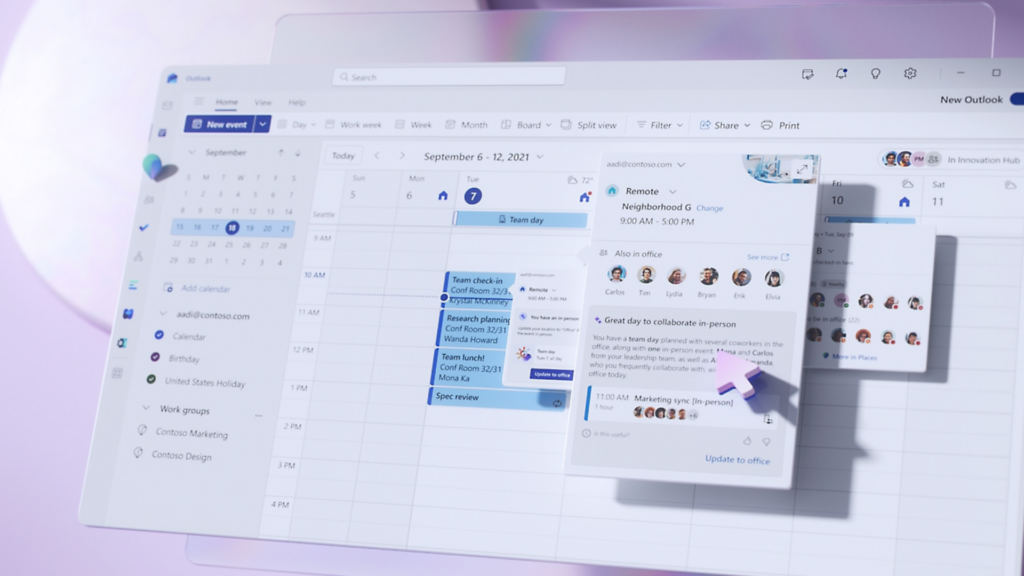
Hybrid work is here to stay, but many organizations still struggle with basics like:
- Who will be in the office, and when?
- Are we using our spaces effectively?
- How do we make booking desks and rooms simple instead of frustrating?
Microsoft Places is designed to answer these questions. And with recent licensing changes, it’s now much easier and more cost‑effective to roll out.
Below are the key benefits for your business.
1. Advanced space booking without Teams Premium
Historically, some of the most useful Places capabilities required Teams Premium, creating a high per‑user cost barrier.
Effective April 1, 2026, Places finder and Places explorer become available to users without requiring a Teams Premium add-on. Microsoft positions these as part of the core Places experiences accessible through Outlook and Teams for eligible Microsoft 365 users. Some capabilities (for example, auto-release and certain occupancy/utilization analytics) still require a space license for the desks/rooms being managed.
In practice:
- Places no longer requires Teams Premium for these core end‑user experiences.
- Because these experiences are included broadly across Microsoft 365, many organizations can roll out richer space discovery and booking without buying Teams Premium for every end user.
- You can enable modern workplace coordination at scale without a major licensing redeployment.
Why it matters: you can quickly put richer booking tools in the hands of most employees and start building better hybrid work habits without a big up‑front licensing debate.
2. Better employee experience with Finder and Explorer
Finding “any available room” is no longer enough. People need to find the right space for the way they’re working.
Places Finder
Places Finder is the enriched booking experience that replaces basic Room Finder.
Users can:
- See images and floorplans for desks and rooms.
- Filter by capacity, amenities, and in‑room technology.
- Make faster, more confident booking decisions directly in the Outlook or Teams calendar.
Places Explorer
Places Explorer provides a map‑based view of your workplaces inside Outlook and Teams.
Employees can:
- Browse buildings, floors, rooms, and desks on an interactive map.
- See who plans to be on‑site and where.
- Understand what’s happening in each location before they commute.
Why it matters: better visibility leads to better on‑site days. People waste less time looking for the right space and are more willing to come in when they can see where colleagues will be and what the office experience will look like.
3. Space‑based licensing that matches how you manage real estate
The biggest structural change is a shift from per‑user to per‑space licensing.
Microsoft is introducing the Teams Shared Space license (renamed from Teams Shared Device) as the space-based license used to enable specific Places capabilities for desks and rooms. Microsoft describes this as licensing the spaces you manage (not every employee), in packs that cover multiple desks/rooms. Pricing: $8 per license for up to 4 spaces—which works out to $2 per space.
With this license you unlock:
- Desk booking in Places – Employees can reserve licensed desks in advance.
- Space management – Admins can configure reservation policies and auto‑release behavior.
- Space analytics – Occupancy/utilization reporting for licensed desks and rooms (for example, occupancy reports require the spaces to have a space license).
Instead of licensing every person who might touch Places, you license the physical inventory you actually want to manage.
Why it matters:
- Costs line up with your real estate footprint, not your headcount.
- Scaling is straightforward: as you add more desks or rooms to your program, you add more Shared Space licenses in predictable blocks.
- It’s easier to show ROI because you can tie utilization and behavior change to specific licensed spaces.
4. Data‑driven workplace strategy and optimization
Many workplace decisions are still based on anecdote: “Nobody uses that floor” or “We can never find a room.” With Places and the Shared Space license, you can start to measure what’s really happening.
For licensed desks and rooms, Places provides space analytics, covering inventory and utilization.
Combined with configured reservation policies (like auto-release) and other signals Microsoft is adding over time, this gives you a clearer picture of:
- Which spaces are consistently over‑ or under‑used.
- How often no‑shows or abandoned bookings block availability.
- How patterns differ by team, location, or day of week.
Over time, this insight can guide:
- Portfolio decisions – Which sites or floors to expand, consolidate, or redesign.
- Space mix – How much focus, collaboration, and social space you really need.
- Change management – Whether new policies and layouts are changing behavior.
Why it matters: you can move from “gut feel” to evidence‑based workplace planning, supporting stronger business cases with finance and leadership.
5. Richer context and more intelligent experiences
Beyond today’s capabilities, Microsoft’s roadmap for Places includes:
- Presence signals (for example, via WiFi) (Q1) – Microsoft’s roadmap includes adding additional signals to improve accuracy about who is in which space, where supported and configured.
- Deeper mapping in scheduling workflows (Q2) – Bringing maps and space selection more directly into everyday scheduling.
- Richer space details (Summer) – More discoverable profiles for buildings, rooms, and desks to help employees choose the right space.
These features deepen the connection between people, spaces, and schedules, so employees don’t just book “Room 3B”—they understand what that space is best for and how it fits into their workday.
Why it matters: this reduces friction and confusion, improves trust in the tools, and encourages consistent, intentional use of spaces.
6. A stronger foundation for large‑scale events
Separately (but announced in the same April 2026 licensing update), advanced Teams town hall and webinar features previously associated with Teams Premium are being extended to users with a Teams Enterprise license. Microsoft states this will allow events with up to 3,000 interactive attendees, plus a view-only experience for town halls up to 10,000. For larger events, Microsoft is introducing attendee capacity packs to scale beyond these limits (up to 100,000 attendees, per the announcement).
For organizations coordinating who’s on‑site with Places and running high‑impact hybrid events in Teams, this creates more seamless experiences across rooms, events, and virtual audiences.
Ready to explore Microsoft Places for your organization?
If you’re evaluating how Microsoft Places fits into your workplace strategy—or want help planning a pilot, licensing model, or rollout—now is the right time to start.
Schedule a meeting with our team to:
- Map Microsoft Places to your existing offices, Teams, and M365 environment
- Review cost and licensing options, including Teams Shared Space licenses
- Design a pilot that balances real‑estate, IT, and employee‑experience goals